PdfDocumentOutlineView.ShowDefaultContextMenu Property
Gets of sets a flag indicating whether the default context menu should be displayed when right-clicking on an outline item.
Property Value
True if default context menu should be displayed when the user right-clicks on an outline item.
Remarks
Setting this property to true enables the default context menu for outline items, allowing users to add, edit, or delete outline items. Setting it to false disables the default context menu, allowing for custom context menu implementations.
The default context menu is shown in the image below:
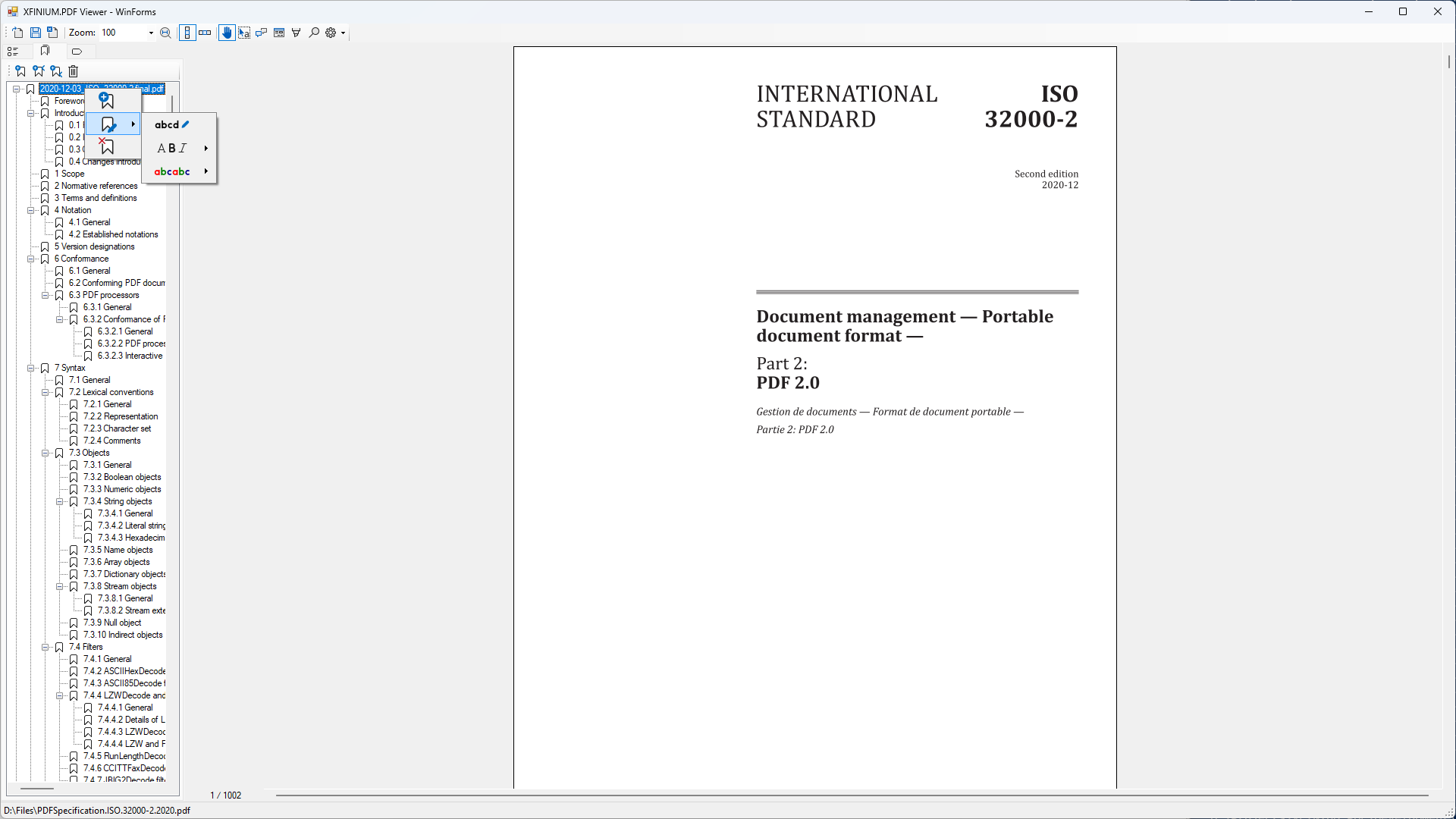 The following options are available in the default context menu:
-
 — Add outline item. When the user clicks this option the BeforeOutlineItemAdd and AfterOutlineItemAdd events are raised. The outline item addition can be cancelled by handling the BeforeOutlineItemAdd event and setting the PdfVisualOutlineItemAddEventArgs.AllowAdd property to false. In this case, the outline item will not be added and the AfterOutlineItemAdd event will not be raised.
-
 — Edit outline item properties.
-
 — Delete outline item. When the user clicks this option the BeforeOutlineItemDelete and AfterOutlineItemDelete events are raised. The outline item deletion can be cancelled by handling the BeforeOutlineItemDelete event and setting the PdfVisualOutlineItemDeleteEventArgs.AllowDelete property to false. In this case, the outline item will not be deleted and the AfterOutlineItemDelete event will not be raised.
The Edit outline item menu item () allows the user to edit the properties of an outline item. The following options are available:
-
 — Edits the outline item title. When the user clicks this option the outline item title becomes editable in the document outline view. ENTER key commits the changes, ESC key cancels the changes.
-
 — Edit the font style used to display the outline item. Regular, bold, italic and bold-italic options are available.
-
 — Edit the color used to display the outline item. A predefined set of colors is available.