PdfThumbnailsView Class
Definition
Namespace: Xfinium.Pdf.View
Defines a viewer control for PDF page thumbnails.
public class PdfThumbnailsView : Control, IComponent, IDisposable, IOleControl, IOleObject, IOleInPlaceObject, IOleInPlaceActiveObject, IOleWindow, IViewObject, IViewObject2, IPersist, IPersistStreamInit, IPersistPropertyBag, IPersistStorage, IQuickActivate, ISupportOleDropSource, IDropTarget, ISynchronizeInvoke, IWin32Window, IArrangedElement, IBindableComponent, IKeyboardToolTip, IHandle, IPdfView
Inheritance: Object → MarshalByRefObject → Component → Control → PdfThumbnailsView
Implements: IComponent, IDisposable, IOleControl, IOleObject, IOleInPlaceObject, IOleInPlaceActiveObject, IOleWindow, IViewObject, IViewObject2, IPersist, IPersistStreamInit, IPersistPropertyBag, IPersistStorage, IQuickActivate, ISupportOleDropSource, IDropTarget, ISynchronizeInvoke, IWin32Window, IArrangedElement, IBindableComponent, IKeyboardToolTip, IHandle, IPdfView
Remarks
Use this control to display thumbnails of PDF pages.
PdfThumbnailsView control
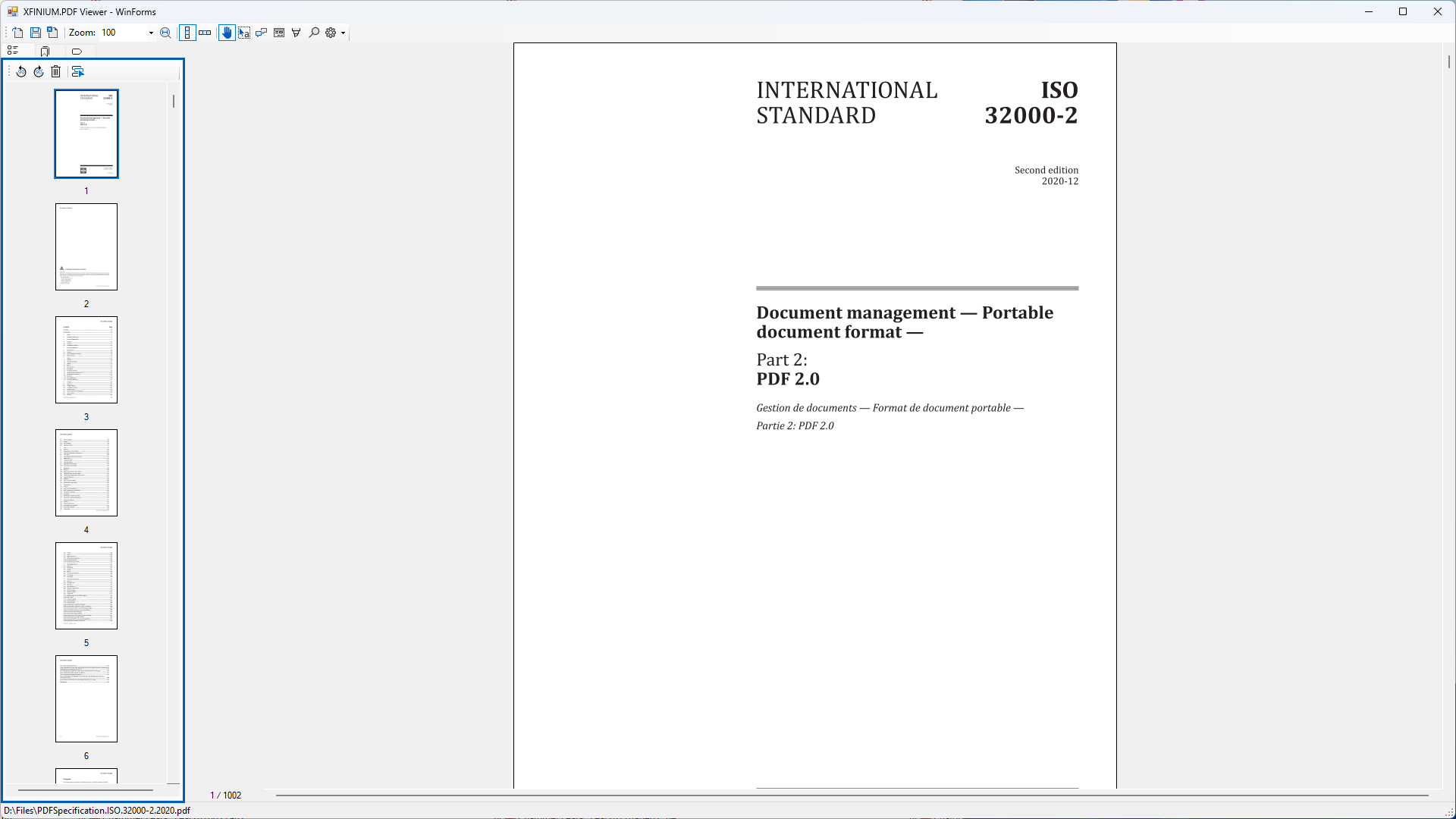 Set the Document property to display the desired PDF document and the DocumentView property to link it to a document view. When the user clicks on a thumbnail in the PdfThumbnailsView, the corresponding page in the linked PdfDocumentView will be displayed, allowing for easy navigation through the PDF document.
Note
To ensure proper functionality, please make sure the value of the Document property matches the document set in the linked PdfDocumentView. Otherwise, the thumbnail navigation may not work as expected.
Page display layouts
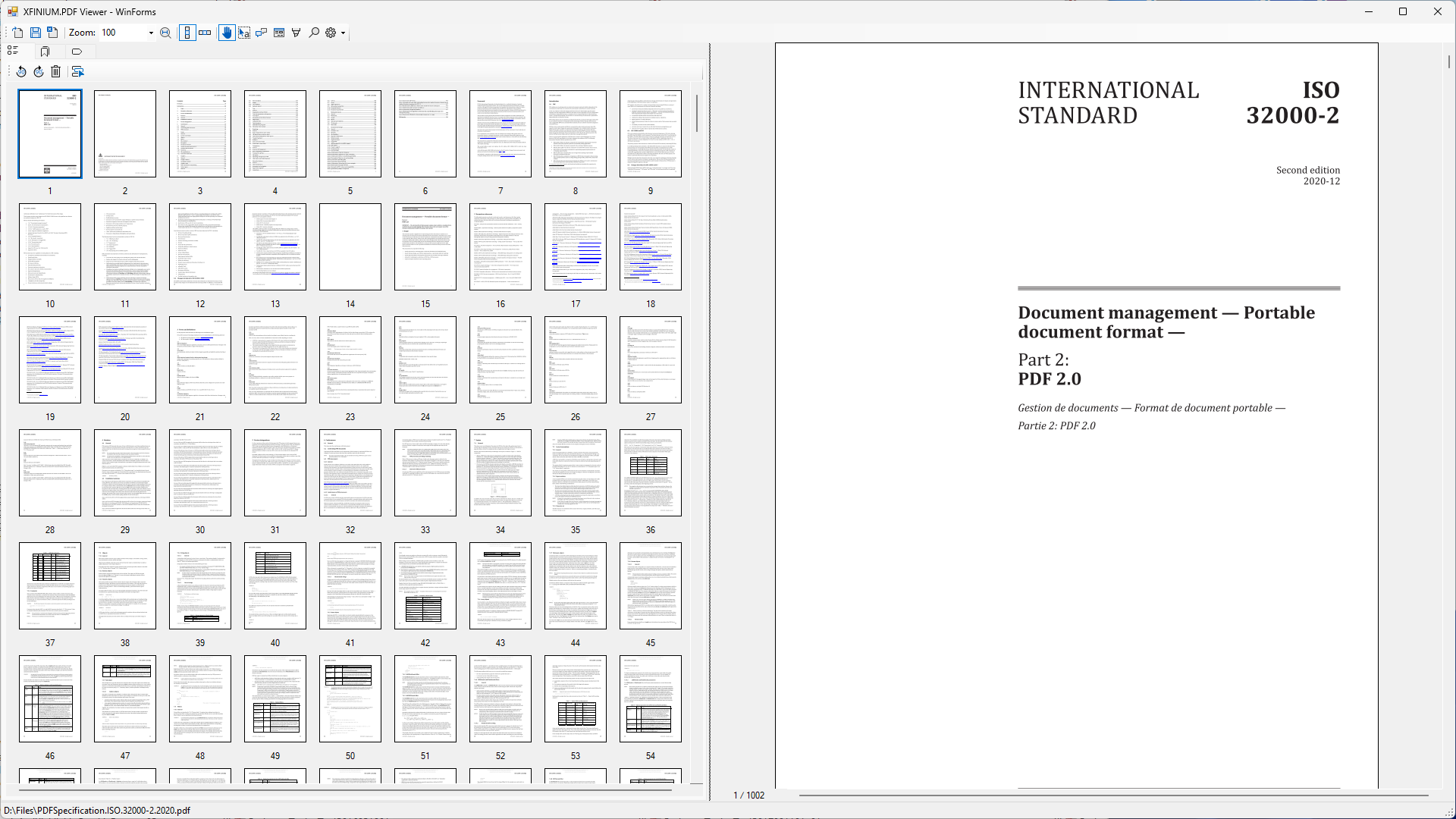
The pages in the thumbnails viewer can be arranged in different layouts, column or row oriented, the PageDisplayLayout property being responsible for specifying the layout.
The column oriented layout is specified by the PdfColumnBasedPageDisplayLayout class.
| C# | |
|---|---|
The row oriented layout is specified by the PdfRowBasedPageDisplayLayout class.
| C# | |
|---|---|
| C# | |
|---|---|
Page zooming
The thumbnails can be enlarged or reduced using the Zoom property. The zoom level is specified as a percentage of the original page size (100% zoom is the original size).
Pages reordering
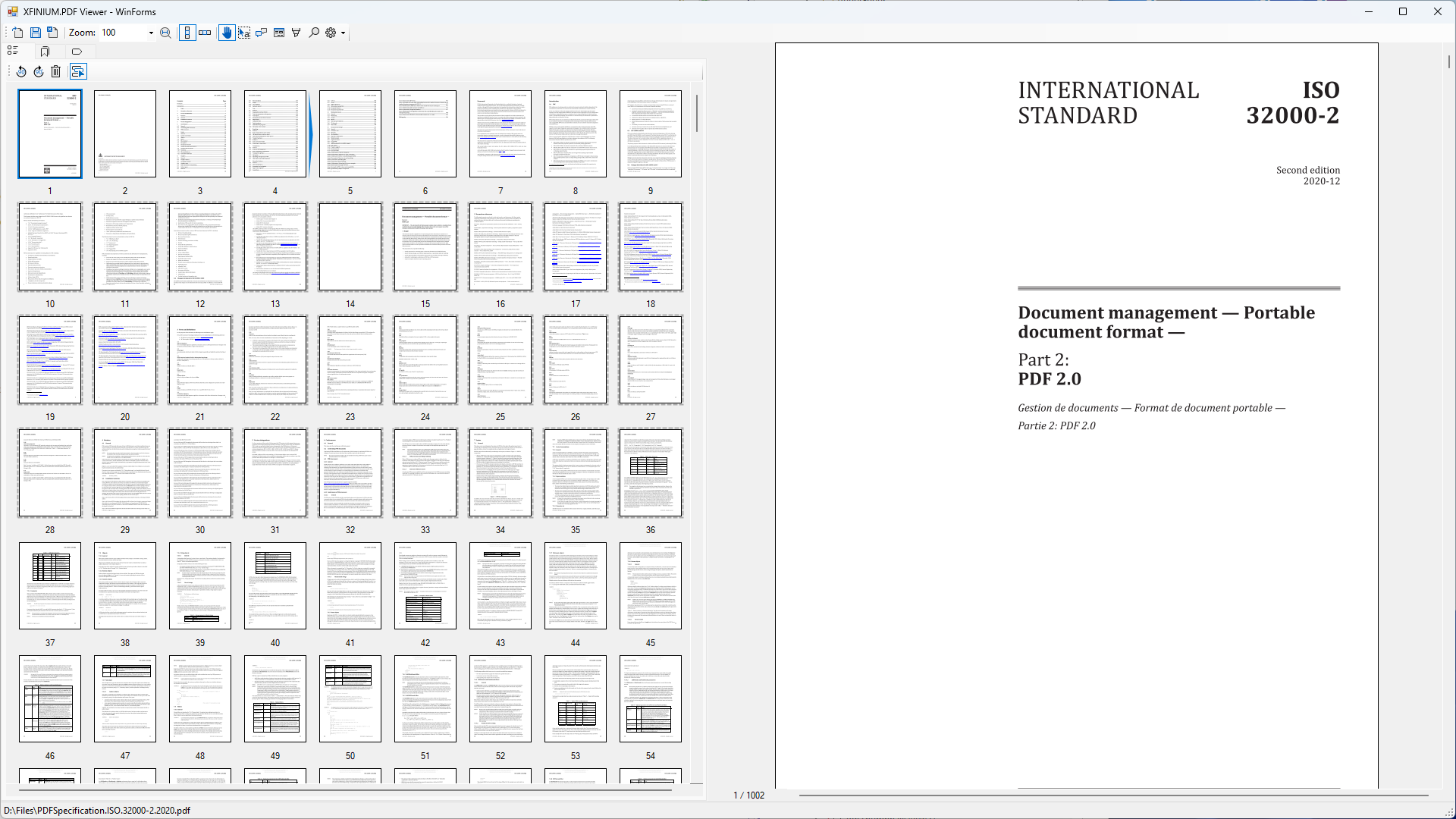
The thumbnails can be reordered by dragging and dropping them to a new position. The user can select one or multiple thumbnails (multiple thumbnails are selected by drawing a selection rectangle over the desired thumbnails) and drag them to a new position in the list.
When the user drops the thumbnails, the BeforePageReorder and AfterPageReorder events are raised. The page reordering can be cancelled by handling the BeforePageReorder event and setting the PdfVisualPageReorderEventArgs.Cancel property to true. In this case, the pages will not be reordered and the AfterPageReorder event will not be raised.
The location of the dropped thumbnails, before or after an existing thumbnail, is indicated by the blue arrow shown in the following image.
 The pages reordering feature can be disabled by setting the AllowPagesReorder property to false.
Context menus
The viewer control can display a default context menu depending on where the user right clicks on the document.
Page context menu
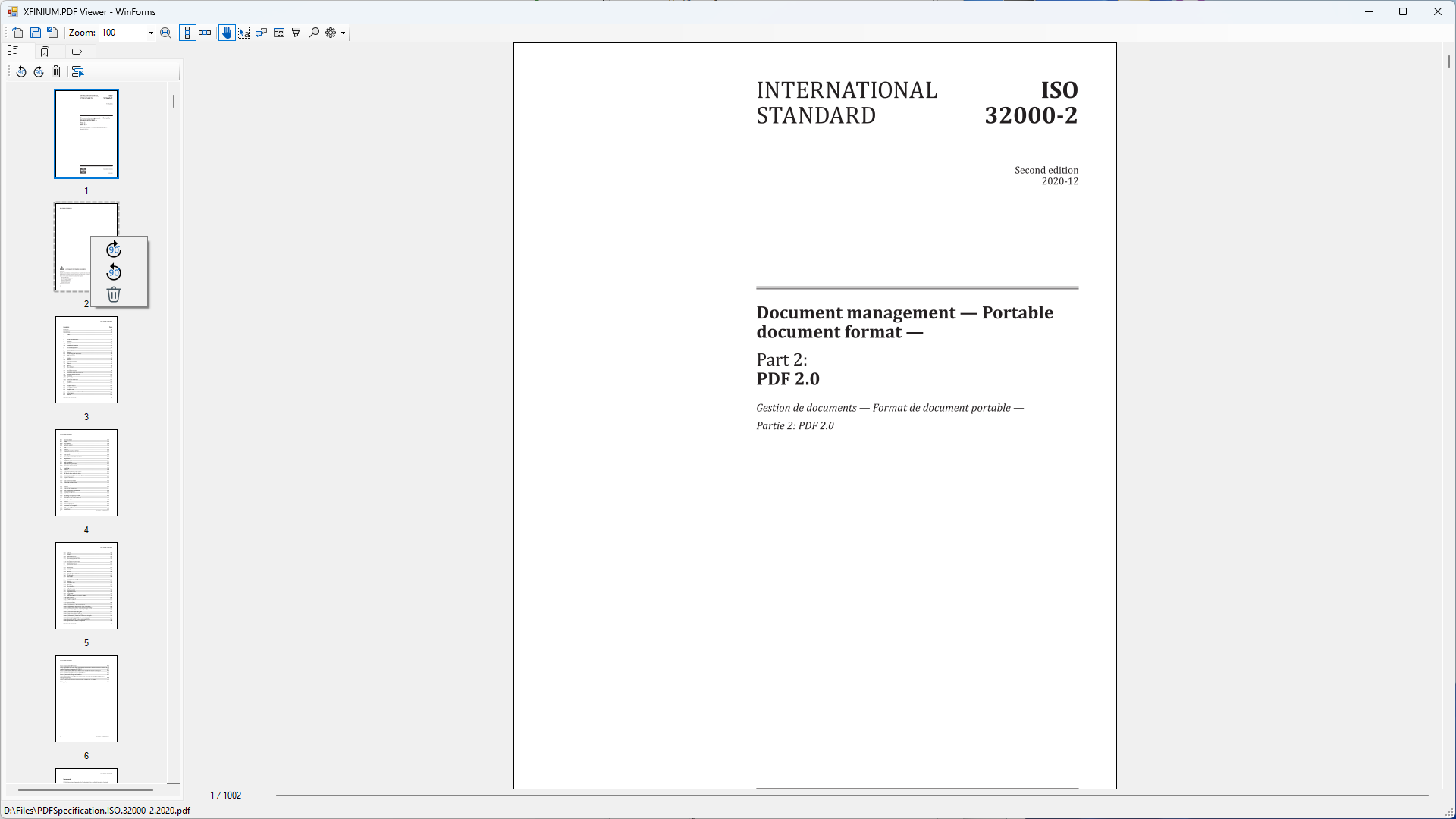 When the user right clicks on a PDF page, the default context menu is displayed, allowing the user to rotate the page or delete it. The following options are available in the default page context menu:
-
 — Rotate page 90 degrees clockwise.
-
 — Rotate page 90 degrees counterclockwise
-
 — Delete page. When the user clicks this option the BeforePageDelete and AfterPageDelete events are raised. The page deletion can be cancelled by handling the BeforePageDelete event and setting the PdfVisualPageDeleteEventArgs.AllowDelete property to false. In this case, the page will not be deleted and the AfterPageDelete event will not be raised.
The default context menu can be disabled by setting the ShowDefaultPageContextMenu property to false.
Example
In your form's constructor initialize the PdfThumbnailsView and link it to a PdfDocumentView as follows:
| C# | |
|---|---|
| C# | |
|---|---|
Constructor
| Name | Description |
|---|---|
| PdfThumbnailsView() | Initializes a new PdfThumbnailsView object. |
Properties
| Name | Description |
|---|---|
| AllowPagesReorder | Gets or sets a flag indicating whether pages reordering is allowed. |
| ContentPosition | Gets the content position. |
| ContentSize | Gets the content size. |
| Document | Gets or sets the document displayed in the viewer. |
| DocumentView | Gets or sets the associated document view. |
| GraphicRendererFactory | Gets or sets the graphic renderer factory. |
| PageDisplayLayout | Gets or sets the current page display layout. |
| PageNumber | Gets or sets the page number. |
| SelectionRectangleAppearance | Gets or sets the appearance of the selection rectangle. |
| ShowAnnotations | Gets or sets a value indicating whether the annotations should be displayed or not. |
| ShowDefaultPageContextMenu | Gets of sets a flag indicating whether the default page context menu should be displayed when right-clicking on a page. |
| ShowFormFields | Gets or sets a value indicating whether the form fields should be displayed or not. |
| ShowPageNumbers | Gets or sets a flag indicating whether page numbers should be displayed. |
| Zoom | Gets or sets the zoom level. |
Methods
| Name | Description |
|---|---|
| ConvertPagePointToViewerPoint | Converts a page point in page visual coordinates to a viewer point in viewer coordinates. |
| GetVisiblePages | Gets the list of visible pages. |
| ScrollToPageLocation | Scrolls the viewer to the specified page at the given location. |
Events
| Name | Description |
|---|---|
| ContentPainted | Gets or sets the event that is fired after the viewer content has been drawn. |
| ContentPositionChanged | Gets or sets the event that is fired when the content position has changed. |
| ContentSizeChanged | Gets or sets the event that is fired when the size of displayed content changes. |
| ZoomChanged | Gets or sets the event that is fired when the zoom has changed. |
| PageNumberChanged | Gets or sets the event that is fired when the page number has changed. |
| PageClick | Gets or sets the event that is fired when a page has been clicked. |
| PageDoubleClick | Gets or sets the event that is fired when a page has been double clicked. |
| PageContextMenu | Gets or sets the event that is fired when a page context menu should be displayed. |
| BeforePageReorder | Gets or sets the event that is fired when a set of pages is about to be reordered using drag and drop operations. |
| AfterPageReorder | Gets or sets the event that is fired after a set of pages has been reordered. |
| BeforePageDelete | Occurs before a page is deleted using the Delete menu item in page's default context menu. |
| AfterPageDelete | Occurs after a page has been deleted. |
| PageRenderingStarted | Gets or sets the event that is fired when a page begins to be displayed. |
| PageRenderingCompleted | Gets or sets the event that is fired when the page content for the page visible area is displayed in full. |
| PageRenderingCancelled | Gets or sets the event that is fired when the page stops displaying content. |